
In the previous article, we explored obyte.js.
Today, we’ll take a look at another practical interface: the URI protocol.
It makes your dApps clickable by letting users jump straight from a link into the wallet. 🚀
Table of Contents
- What is the URI Protocol?
- Why Deeplinks Are Useful
- Deeplinks in Practice
- Deeplinks with Autonomous Agents
- AA Deeplink Generator
- Conclusion
What is the URI Protocol?
These special links are called Deeplinks because they jump directly into a specific function of the wallet.
The Obyte wallet recognizes links in the following format:
obyte:Such Deeplinks open the Send screen in the wallet and automatically fill in all provided parameters.
A Deeplink can include the following:
- Recipient address
- Asset (e.g. Bytes or USDC)
- Amount
- Additional data (e.g. parameters for an Autonomous Agent)
Deeplinks can be used in websites, QR codes, or dApps – leading users directly to a prefilled action inside the wallet.
👉 For the Testnet, the schema is:
obyte-tn:This allows you to safely test and integrate your dApps in a controlled environment.
Why Deeplinks Are Useful
Deeplinks are small but powerful tools that make interacting with Autonomous Agents (AAs) much easier and come with several key advantages:
- User-friendly: No need to manually type addresses or amounts.
- Secure: Eliminates copy-and-paste errors when entering addresses.
- Versatile: Can be embedded in websites, QR codes, or dApps.
- Interactive: Lets developers seamlessly connect their dApps with the wallet.
In short, Deeplinks make Obyte applications more intuitive, secure, and modern.
Deeplinks in Practice
The following examples show how simple Deeplinks are to use:
Simple Payment
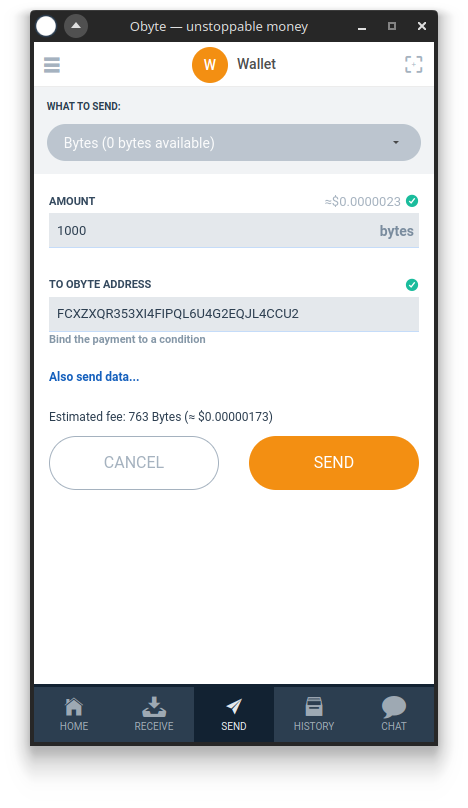
With Deeplinks, you can send Bytes directly — one link is enough, and the wallet opens with the recipient and amount already filled in.
obyte:ADDRESS?amount=1000

or

obyte:ADDRESS?amount=1000&asset=base
👉 Try it yourself:
obyte:FCXZXQR353XI4FIPQL6U4G2EQJL4CCU2?amount=1000
💡 Note
amount=1000→ amount to sendasset=base→ Bytes (GBYTE – the Coin of Obyte)- For Bytes,
asset=basedoesn’t need to be specified — it’s the default.
Payment with an Asset
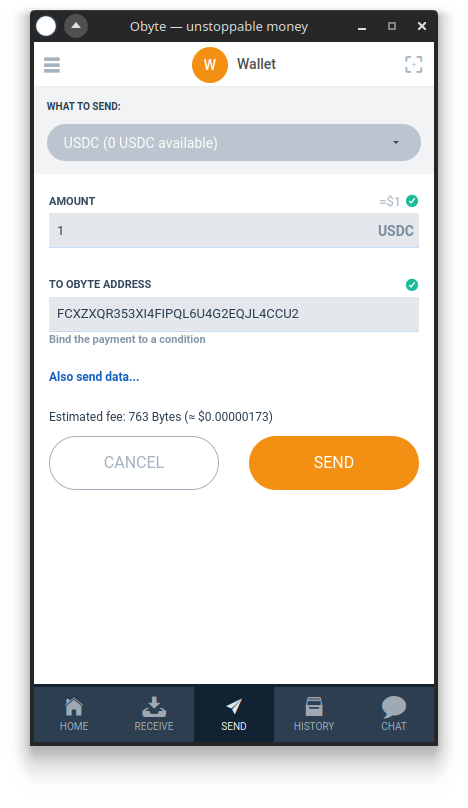
With Deeplinks, you can send not only Bytes but also other tokens such as USDC or WBTC — by specifying the corresponding Asset ID.
obyte:ADDRESS?amount=10000
&asset=ASSET_ID
👉 Try it yourself:
obyte:FCXZXQR353XI4FIPQL6U4G2EQJL4CCU2?amount=10000&asset=S/oCESzEO8G2hvQuI6HsyPr0foLfKwzs%2bGU73nO9H40%3d
💡 Note
- Example: USDC → S/oCESzEO8G2hvQuI6HsyPr0foLfKwzs%2bGU73nO9H40%3d
- Make sure the Asset ID in the Deeplink is URL-encoded (no special characters).
Multiple Assets in a Single Transaction
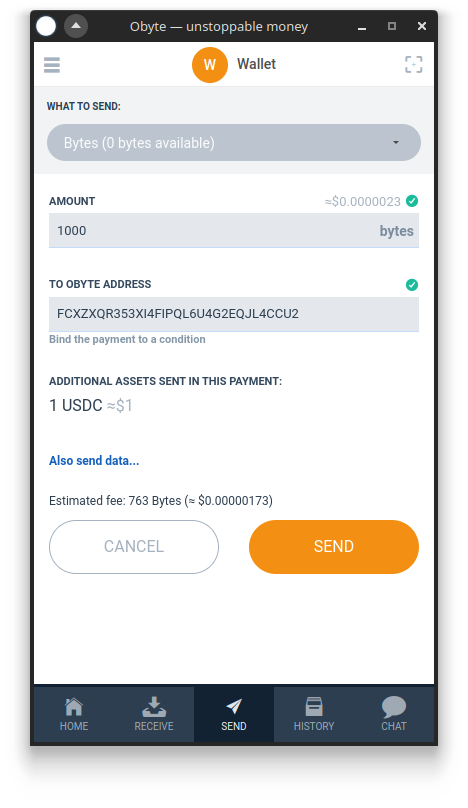
The Obyte URI protocol supports not only single payments but also transactions with multiple outputs.
This allows you to send several assets to the same recipient within one Deeplink.
obyte:ADDRESS?amount=1000&asset=base
&amount2=10000&asset2=ASSET_ID
👉 Try it yourself:
obyte:FCXZXQR353XI4FIPQL6U4G2EQJL4CCU2?amount=1000&asset=base&amount2=10000&asset2=S/oCESzEO8G2hvQuI6HsyPr0foLfKwzs%2bGU73nO9H40%3d
💡 Hinweis
amount+asset→ first outputamount2+asset2→ second outputamount3+asset3→ third output, and so on.
Deeplinks with Autonomous Agents
Deeplinks show their full potential when interacting with AAs.
Instead of manually typing inputs in the wallet, a prepared link is all you need.
This makes interacting with AAs as simple as checking out from an online store.
Pocket Money AA
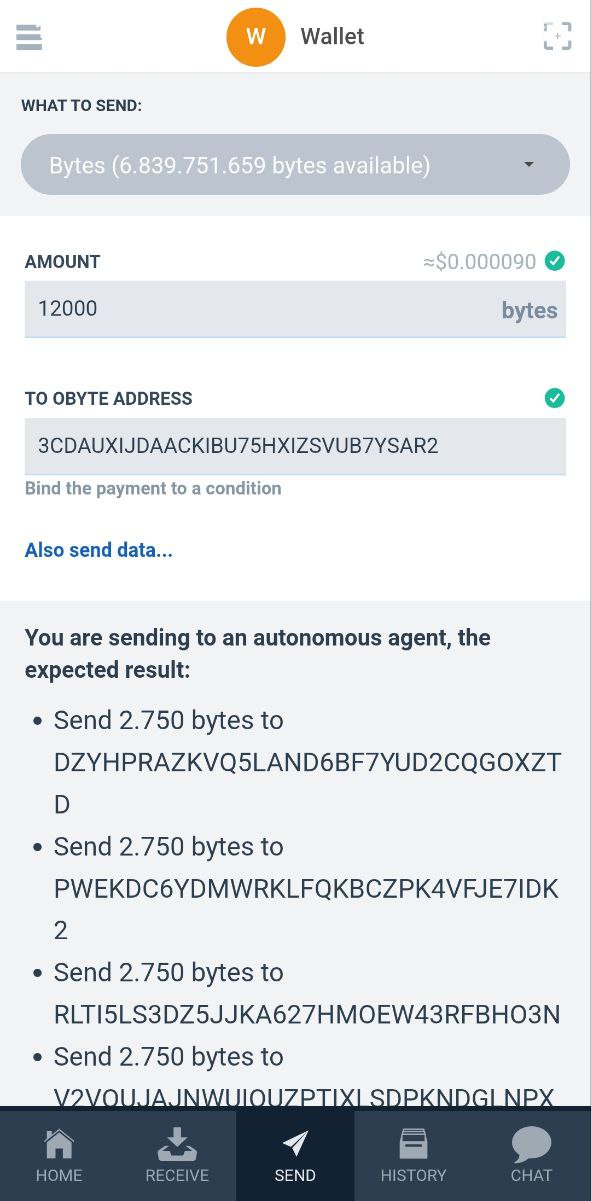
In the AA tutorial, we saw how father Michael used an Autonomous Agent to automatically split pocket money among his four children.
Thanks to the URI protocol, a single Deeplink is all it takes:
obyte-tn:AA_ADDRESS?amount=12000👉 Try it yourself:
obyte-tn:3CDAUXIJDAACKIBU75HXIZSVUB7YSAR2?amount=12000
💡 Note
AA_ADDRESS→ address of the previously created Allowance AAamount=12000→ total amount in Bytes
Buy a Plot in Obyte City
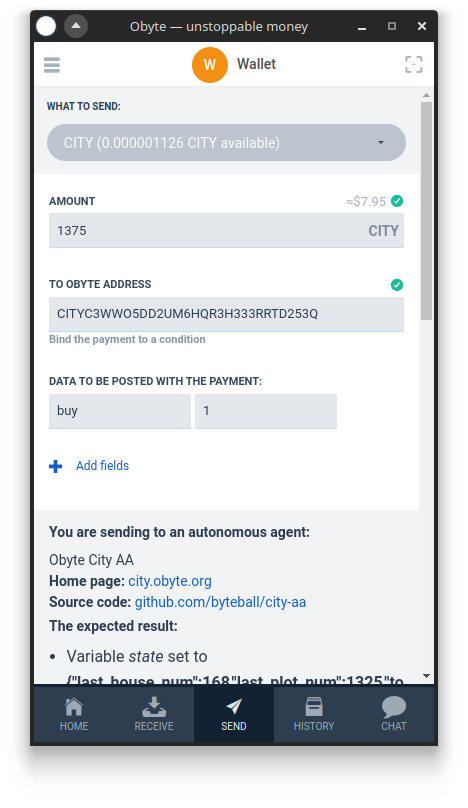
To purchase a plot in Obyte City, you send a message containing the additional data buy=1 to the City AA:
obyte:CITY-AA?amount=1375000000000
&asset=HoKGB%2BQQ8%2BjZ4hZHqvZwNYcsrbP0Njztxn6t4BQro4M%3D
&base64data=eyJidXkiOjF9
👉 Try it yourself:
obyte:CITYC3WWO5DD2UM6HQR3H333RRTD253Q?amount=1375000000000&asset=HoKGB%2BQQ8%2BjZ4hZHqvZwNYcsrbP0Njztxn6t4BQro4M%3D&base64data=eyJidXkiOjF9
💡 Note
CITYC3WW...→ address of the City AAamount=1375000000000→ 1 GBYTE deposit + 0.375 GBYTE purchase pricebase64data=…→ contains the databuy=1
💡 Note – Base64 Encoding in Deeplinks
Since Deeplinks cannot process JSON structures directly (e.g.
{ "buy":1 }or{ "leave":1, "plot_num":1238 }),
such data must be encoded in Base64 before being included in the link.
Leaving a Plot
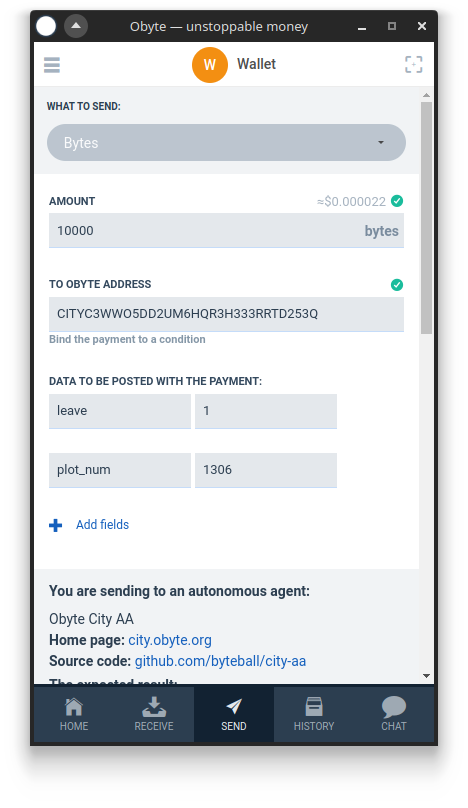
To leave a plot, you need to send the data leave=1 and plot_num=1306 to the City AA.
Here’s how it looks as a Deeplink:
obyte:CITY-AA?amount=10000
&base64data=eyJsZWF2ZSI6MSwicGxvdF9udW0iOjEyMzh9
👉 Try it yourself:
obyte:CITYC3WWO5DD2UM6HQR3H333RRTD253Q?amount=10000&base64data=eyJsZWF2ZSI6MSwicGxvdF9udW0iOjEzMDZ9
💡 Note
CITYC3WW…→ address of the City AAamount=10000→ transaction feebase64data=…→ contains the actionleave=1andplot_num=1306
AA Deeplink Generator
To help you quickly test your own actions in Obyte City or other AAs, we’ve built a small interactive generator for you.
Conclusion
With Deeplinks, every idea becomes just one click away.
They connect code, wallet, and creativity into a seamless experience – direct, simple, and powerful.
Together with Autonomous Agents and obyte.js, they enable fully functional dApps that work without servers or blockchain overhead.
The tools are here – now it’s up to you to build the next great dApp on Obyte. 🚀
Learn more: